
When I was picking speakers for my own home theater, the hard part wasn’t finding options. It was telling them apart. Every retailer page describes five speaker types and five channel counts like they’re all variations on the same purchase, and none of them actually says how to choose between them.
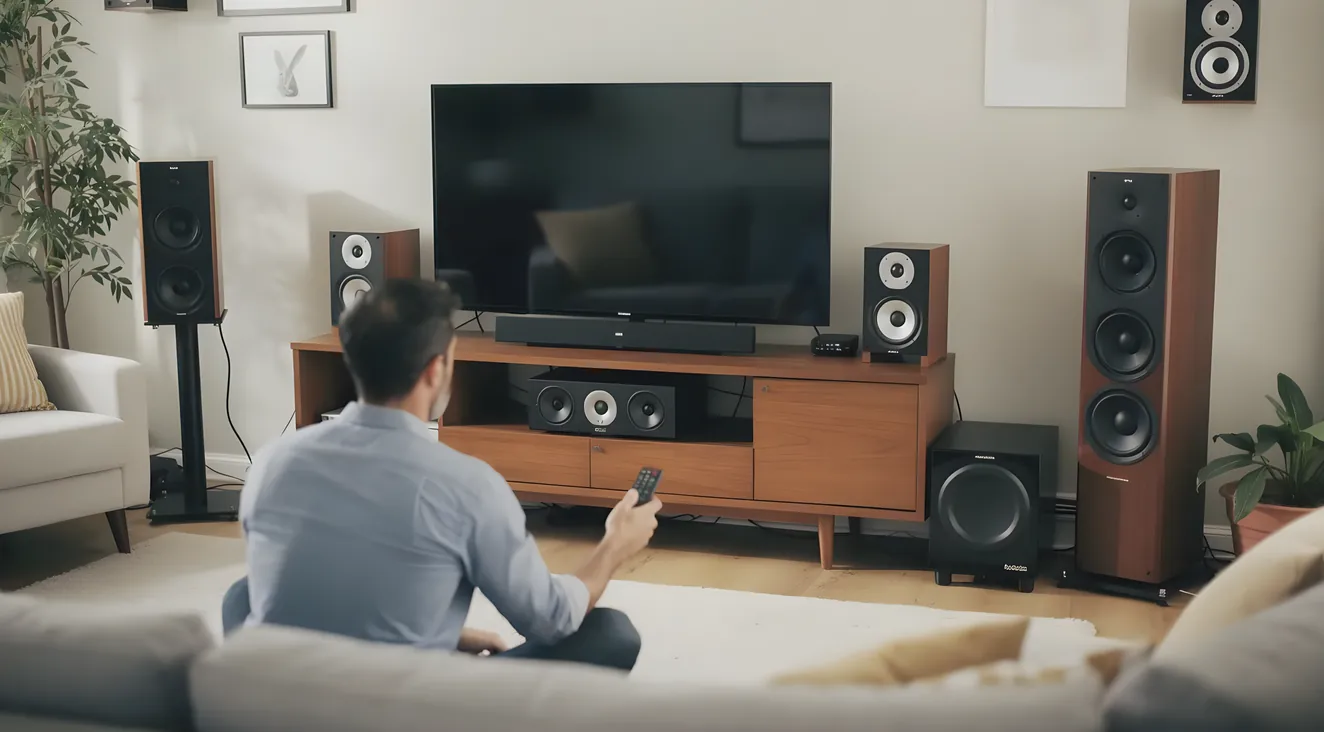
There are really three separate decisions hiding inside that one purchase: which speaker type fits your room, what channel configuration your system should target, and how to compare two specific speakers once you’ve narrowed down the type and count. This guide answers all three, and it comes with a real comparison table, not another paragraph asking you to keep five speaker types straight in your head.
Quick vocabulary check before anything else, because you’ll see notation like 5.1.2 throughout this guide, explained in full below.
One more thing up front. I’m not going to tell you the best speaker brand or model to buy. Buying-guide picks like that tend to be discontinued within a few years as product lineups change, which tells you everything about how useful a “best speaker” list turns out to be a few years later. What holds up is knowing how to evaluate a spec sheet yourself, so that’s what I’m teaching you instead.
The Five Speaker Types, and Which One Fits Your Room
Five speaker types show up in almost every home theater build, and each one trades something for something else. None of them is universally better. They’re just built for different rooms and different budgets.
Floorstanding (tower) speakers sit on the floor and house the largest cabinets and drivers of the five types, which is exactly why they deliver the deepest native bass extension and the highest maximum output without a subwoofer’s help. That capability costs floor space and money: towers need real footprint in the room and they’re typically the most expensive speaker type per channel within a given product line. The common approach, and the one I used, is to put towers only on the front left and right, where bass and headroom matter most, and use something smaller for the center channel and surrounds.
Bookshelf speakers are the more compact 2-way alternative: a woofer and a tweeter in a cabinet small enough for a stand or a shelf. They depend on a subwoofer for real low end, but their smaller cabinet volume often gives them tighter, more precise imaging in a small-to-medium room than a tower would. Bookshelf speakers are also generally the most affordable full-range option within a given line, and their size makes placement far more flexible than a tower’s. Treat bookshelf-plus-subwoofer as a legitimate strategy rather than a compromise. In a lot of rooms, a well-placed subwoofer does more for the bass than a taller cabinet fighting the room’s own bass modes ever will.
In-wall and in-ceiling speakers recess the driver into the wall or ceiling cavity, leaving nothing but a paintable grille visible. The appeal is obvious: a clean room with no visible speaker footprint at all. The tradeoff is acoustic, not cosmetic. The cavity behind that grille constrains driver size and cabinet volume compared to a free-standing speaker at a similar price, which limits dynamic range and bass extension. In-wall and in-ceiling models are the standard choice for Atmos and DTS:X height channels specifically, which I’ll get into further down, and they’re a reasonable pick for surrounds when floor or stand space isn’t available. For a dedicated front left, center, and right, though, it’s a real compromise, not a free upgrade.
Satellite speakers are the smallest cabinet class on this list, built specifically to be paired with a dedicated subwoofer rather than run full-range. They reproduce mid and high frequencies only and hand bass off entirely to the sub. Most buying guides skip this category and jump straight from bookshelf to surround or height speakers. That’s a real gap, because satellites are a common, legitimate choice for front, center, or surround duty in a budget-to-midrange system where minimizing visual footprint matters more than raw output.
Soundbars replace the whole discrete speaker array with a single enclosure, sometimes paired with a separate wireless subwoofer. The real tradeoff is convenience versus performance. A soundbar is genuinely plug-and-play, usually a single HDMI eARC connection with no receiver and no channel wiring, while a discrete system takes more setup but gives you actual spatial separation between speakers positioned around the room. Many soundbars claim Atmos or 5.1 surround through “virtual” processing, bouncing and psychoacoustic tricks from one enclosure, and that rarely matches the imaging of speakers actually positioned where the sound is supposed to come from.
None of that makes a soundbar a lesser version of a real system. It’s a different product category, a legitimate option for a space-constrained room, and worth treating that way rather than dismissing outright. If you’re still not sure whether you’re building a discrete system or landing on a soundbar, it’s worth stepping back to what actually makes something a home theater system before you shop for either.
Once you know roughly which type or types fit your room, here’s how they stack up against each other directly.
| Speaker Type | Best Role in a System | Bass Extension (No Sub) | Footprint | Cost Tier (Relative) | Atmos/Height Role |
|---|---|---|---|---|---|
| Floorstanding (tower) | Front left/right in larger or dedicated rooms | Deepest of the five types | Largest; needs real floor space | Highest | Not used for height |
| Bookshelf | Front L/R in small-medium rooms, center, or surrounds | Limited; needs a sub for real bottom end | Small; needs a stand or shelf | Baseline | Not typically used for height |
| In-Wall/In-Ceiling | Surrounds where floor space isn’t available; standard for true height channels | Limited by the cavity versus a freestanding cabinet | Smallest visible footprint (recessed) | Varies; install cost adds up | Best option for precise overhead imaging (in-ceiling) |
| Satellite | Budget-to-midrange front/center/surround, always paired with a sub | Weakest; hands bass off entirely | Very small | Lowest | Not typically used for height |
| Soundbar | Full front-stage substitute for space-constrained rooms | Varies; often thin without the included sub | Single enclosure, minimal | Varies | Virtual/reflected Atmos on some models; not equivalent to discrete height speakers |
5.1, 7.1, and the Atmos Height Digit: What the Numbers Mean
The hub post on this site already covers what object-based audio is and how Dolby Atmos and DTS:X differ from older channel-based mixing, so I won’t re-explain that here. What matters for choosing speakers is what the numbers mean and which configuration your room can actually support.
5.1 is five ear-level speakers, front left, center, front right, and two surrounds, plus one subwoofer for the “.1”. It’s the baseline configuration, and it stays the baseline because most movie and streaming content is still mixed for 5.1 at minimum. Nothing about “more channels” makes 5.1 obsolete. It’s the floor everything else builds on.
7.1 adds two more surround channels, typically placed behind the seat, on top of a 5.1 layout. What that buys you is smoother panning as sound moves around and behind the listener. A 5.1 room can leave a noticeable gap between the side surrounds and whatever’s happening directly behind you; 7.1 closes it.
The X.Y.Z notation for Atmos and DTS:X height configurations follows Dolby’s own definition exactly: the first number is your ear-level speakers, the second is subwoofers, and the third, if there is one, is the number of height speakers, as stated directly on Dolby’s official Atmos speaker setup guide.
Three configurations show up constantly in real builds. 5.1.2 is a standard 5.1 layout plus two height speakers, and it’s the common entry point for a small-to-medium room adding overhead sound for the first time. 5.1.4 is the same base layout with four height speakers instead of two, giving stronger overhead imaging in a medium-sized room. 7.1.4 combines the full 7.1 layout with four height speakers, generally described as delivering the fullest dome of sound, and it’s really a large dedicated room’s configuration rather than a starting point.
Here’s the practical takeaway, and it’s the one thing I’d tell a friend before they spend money: buy for height-channel hardware, meaning how many overhead speakers your room can realistically support, rather than agonizing over Atmos versus DTS:X. Both formats render gracefully with or without height speakers present, since both are object-based and will use whatever speakers you actually have. The format war matters less than whether your ceiling can take a speaker in it.
| Configuration | Ear-Level Speakers | Subwoofers | Height Speakers | Best Room Fit | When It’s Worth the Upgrade |
|---|---|---|---|---|---|
| 5.1 | 5 | 1 | 0 | Small to medium rooms | Baseline; most content is mixed for this minimum |
| 7.1 | 7 | 1 | 0 | Larger rooms with space for extra rear surrounds | When a 5.1 room leaves a noticeable side-to-rear gap |
| 5.1.2 | 5 | 1 | 2 | Small to medium room, entry point into overhead sound | When you watch a lot of Atmos/DTS:X content and want overhead cues without a full rebuild |
| 5.1.4 | 5 | 1 | 4 | Medium dedicated room | When two height speakers felt thin and you want stronger overhead imaging |
| 7.1.4 | 7 | 1-2 | 4 | Larger dedicated theater room | When you have the room and budget for the fullest dome of sound; not a first system |
How to Read a Speaker Spec Sheet (Not Just the Watts Number)
This is the section that actually makes the comparison table above useful once you’ve narrowed your options down to two or three real candidates. Sensitivity, impedance, frequency response, and RMS power handling are the four numbers that matter, and they only mean something read together.
Sensitivity, measured in decibels, tells you how loud a speaker plays for a given amount of power, standardized as sound pressure level at 1 watt and 1 meter, or the equivalent 2.83 volts into a nominal 8-ohm load. The methodology behind that measurement traces back to IEC 60268-5, the international standard for loudspeaker measurement. The stakes here are concrete: a 3 dB difference in sensitivity is roughly the same as needing double the amplifier power to hit the same volume. Two speakers that look similar on paper can need very different amounts of power to sound equally loud.
Impedance, measured in ohms, is the electrical load a speaker presents to whatever’s driving it. Most home speakers are rated 4, 6, or 8 ohms. What matters is checking that number against your receiver’s rated range, commonly 4 to 16 ohms on a modern AV receiver. This is the spec that tells you what to check for on the speaker side; actually choosing a receiver that handles your full setup, channel count and all, is covered in full over there.
Frequency response is the range of pitches a speaker reproduces, but a bare range like “20 Hz to 40,000 Hz” is close to meaningless without a stated tolerance. Any speaker can claim a huge range if the cutoff is measured at a loose enough drop in output. A spec sheet worth trusting states the tolerance, something like “55 Hz to 20 kHz ±3 dB.” The tighter that window, the more evenly the speaker actually reproduces what it claims to reach, instead of technically touching the edges with major peaks and dips in between.
Power handling comes in two flavors, and only one of them matters. RMS is continuous power handling, the number that describes real-world use. Peak or PMPO figures describe brief transient bursts and get inflated for marketing constantly. When you’re checking whether a speaker matches a receiver channel, match RMS to RMS, never RMS to a receiver’s peak spec.
And here’s the myth worth killing outright: a higher wattage number does not mean a louder speaker. Loudness comes from sensitivity and efficiency, not power-handling capacity. A lower-wattage, high-sensitivity speaker can genuinely outplay a higher-wattage, low-sensitivity one. If you’re comparing two speakers by watts alone, you’re comparing the wrong number.
One more thing worth knowing exists, even if you never see it on a box: there’s a real, peer-reviewed measurement standard behind speaker sound-quality claims called CTA-2034-A, commonly called the “Spinorama.” It’s not what gets printed on a retail listing, but it’s the difference between trusting a marketing chart and knowing there’s an actual rigorous method underneath the number.
The Four Numbers That Actually Matter
Sensitivity
A 3 dB gap needs double the amp power to hit the same volume.
Impedance
Check it against your receiver's rated range, usually 4 to 16 ohms.
Frequency Response
Meaningless without a stated tolerance, like "±3 dB."
Power Handling
Match RMS to RMS. Never RMS to a receiver's peak spec.
Timbre Matching: The Detail Most First-Time Buyers Skip
Timbre is a speaker’s tonal “voice,” the reason a piano and a trumpet playing the identical note still sound different. Two different speaker models color the same signal differently, even when every other spec lines up.
The One Rule for Front L/C/R
Buy your front left, center, and right speakers from the same product line. Everything else about timbre matching follows from that one purchase decision.
That matters most for your front left, center, and right speakers specifically, because dialogue and on-screen sound routinely pan across those three as a scene plays out. If the timbre doesn’t match, a voice audibly changes character moving from the left speaker to the center to the right, so the same actor sounds like someone else mid-scene.
The fix is simple: buy your front left, center, and right from the same product line. Speakers in a matched line share driver materials and crossover voicing by design, which is exactly what keeps that tonal consistency intact. Mixing brands across the front three is the one thing worth actively avoiding. The same logic applies to surrounds and height speakers too, just with lower priority.
In-Ceiling, Upward-Firing, or In-Wall: Choosing Your Height Speakers
Once you’ve decided your room can support height channels, you’ve got three hardware options, and they’re not interchangeable in effect.
Don't Mix Height Speaker Types
Pick one hardware type, in-ceiling, upward-firing, or in-wall, and use it for every height channel in the room. Mixing types creates timing and tonal inconsistencies that automatic room correction can't fully fix.
True in-ceiling speakers, mounted directly overhead and firing straight down, deliver the most precise and accurate overhead imaging of the three. If cutting into the ceiling is feasible, this is the option to build toward. It works best with ceiling heights roughly between 8 and 11 feet.
Upward-firing modules sit on top of your front or surround speakers and bounce sound off the ceiling to fake an overhead source. They’re affordable and don’t require touching the ceiling, but the reflected sound is inherently more diffuse, and the whole effect depends on a flat, reflective ceiling. Vaulted, textured, or open-beam ceilings flatten or kill the illusion entirely.
In-wall height speakers, mounted high and angled down toward the seating position, split the difference. Less precise than true in-ceiling, but more convincing than skipping height channels altogether.
Whichever you pick, keep your height speakers as a matched set. Mixing upward-firing modules with true in-ceiling speakers in the same room creates timing and tonal inconsistencies that automatic room correction can’t fully fix, a point backed up by Dolby’s own Atmos installation guidelines.
Matching Speakers and Channel Count to the Room You Actually Have
Everything above comes back to one practical driver: the room you actually have, not the room you wish you had. A small room is well served by a straightforward 5.1 setup. There’s neither the physical space nor much acoustic benefit to running more channels than that. A larger dedicated room has the space, and usually the budget, to support 7.1 or one of the Atmos and DTS:X height configurations.
The subwoofer’s role in every configuration above, the “.1” in 5.1 or the “.1” in 7.1.4, is part of this decision too, but where to physically put it in the room is a separate question this post doesn’t answer. That’s where to actually put it.
Once you’ve settled on a speaker type, a channel count, and checked impedance and power specs against a receiver, two decisions are left: which receiver actually drives the setup you just built, and which wire gauge to run to reach every speaker in it. Get those two right, and the system you designed on paper is the system you’ll actually hear.
Match Your Room to a Starting Configuration
Small room
5.1. The baseline. Most content is mixed for this minimum.
Larger room
7.1. Closes the side-to-rear gap a 5.1 room leaves.
Dedicated theater room
5.1.4 or 7.1.4, budget and space allowing.
Frequently Asked Questions
What’s the difference between 5.1 and 7.1 surround sound?
5.1 uses five ear-level speakers, front left, center, front right, and two surrounds, plus one subwoofer. 7.1 adds two more surrounds, usually behind the seat, which smooths the sound as it pans from the side of the room toward the back. Neither is automatically better; the room-fit table above shows which config fits which room.
Do I really need 5.1 surround sound, or is a smaller setup fine?
Most movies and streaming shows are still mixed for 5.1 at minimum, which is why it’s treated as the baseline rather than an optional upgrade. A soundbar can sound genuinely good in a smaller room, but it’s a different product category, not a scaled-down 5.1 system.
Is upgrading from 5.1 to 7.1 worth it?
The 5.1 vs 7.1 decision mostly comes down to room size, not budget. In a smaller room, the extra 7.1 surrounds sit too close to your existing side surrounds to add real separation. In a larger room, they close the gap a 5.1 room leaves between side and rear sound. Check the room-fit column in the channel-configuration table before spending on the upgrade.
Is Dolby Atmos better than plain 7.1?
They’re not doing the same job. 7.1 adds ear-level speakers; Atmos adds height. Atmos content still plays fine on a plain 7.1 system, since the receiver renders height-positioned sound into whatever speakers you have. The real decision is whether your room can support height-channel hardware at all.
How many speakers do I actually need for a home theater?
There’s no single right number for every room. It depends on the configuration you’re targeting: 5.1 is six total speakers counting the subwoofer, 7.1 is eight, and a .2 or .4 height config adds two or four more on top. The channel-configuration table above lists each config’s speaker count next to the room size it tends to fit.
Is it better to get a soundbar or a full set of speakers?
They solve different problems, not the same problem at different price points. A soundbar is plug-and-play and a real upgrade over TV speakers, but its surround effect is virtual, bounced out of one enclosure. A discrete system needs more setup but gives you real spatial separation, since the sound is actually coming from where each speaker sits.
What’s the best brand of home theater speakers?
I won’t name one. Buying-guide picks tend to age out within a few years as product lineups change. What actually holds up is the criteria: check sensitivity, impedance, and frequency-response tolerance against your receiver, and buy your front left, center, and right from one product line so the timbre matches.